在 Emacs 中用 Elfeed 阅读订阅流
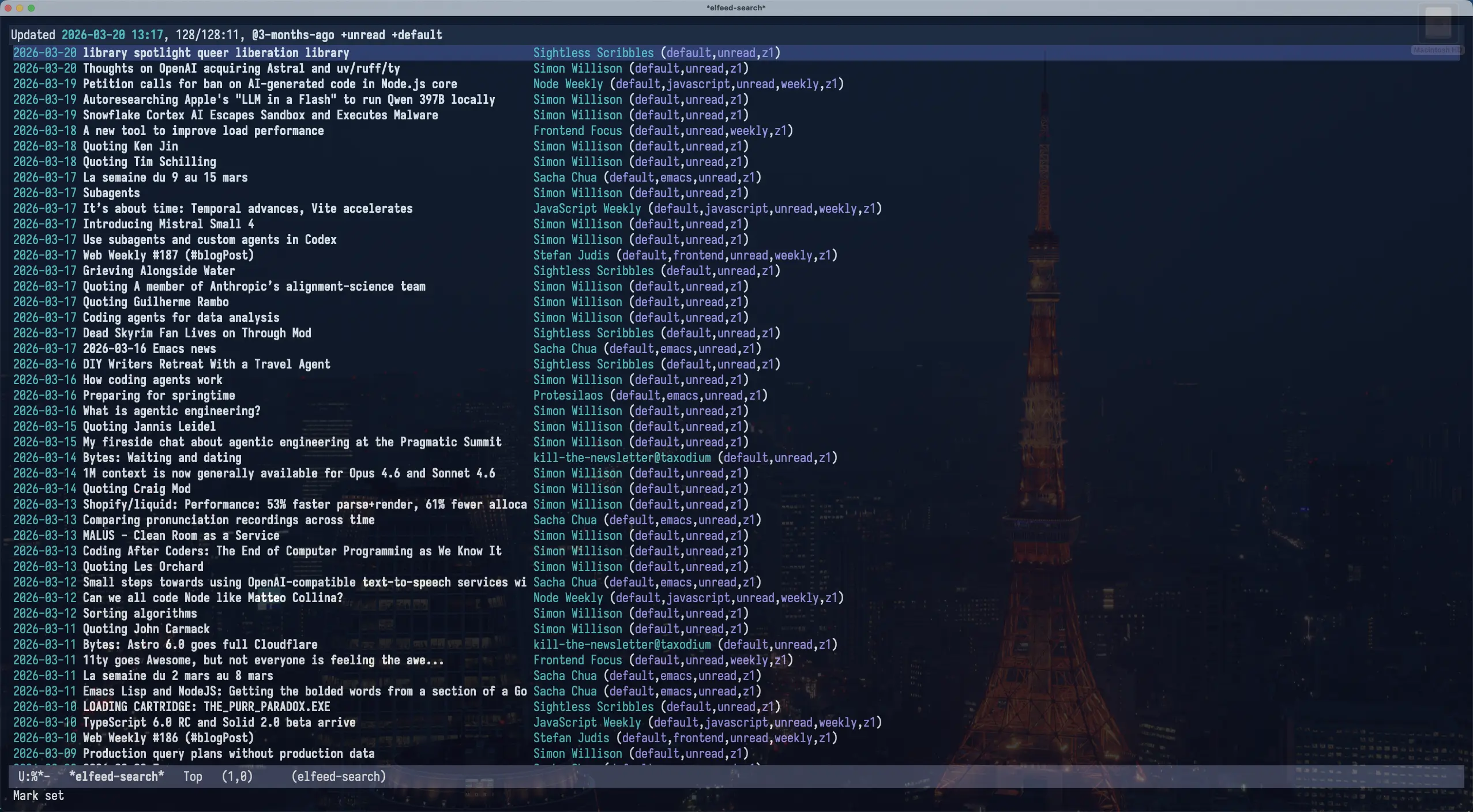
在 Emacs 里,可以用 skeeto/elfeed 阅读订阅流(关于订阅流),为了方便管理订阅流,我还会结合 remyhonig/elfeed-org 一起用,在一个 org 文件里维护所有的订阅。
在 Emacs 中可以这样配置:
(defconst spike-leung/elfeed-org-files "~/.emacs.d/elfeed.org"
  "My elfeed org files path.")

(use-package elfeed
  :custom
  (elfeed-search-filter "@3-months-ago +unread +default"))

(use-package elfeed-org
  :hook ((after-init . elfeed-org))
  :init (setq rmh-elfeed-org-files (list spike-leung/elfeed-org-files)))
如果使用 elfeed-org ,注意在执行 elfeed 前先执行 elfeed-org ,让 elfeed-org 将 org 文件的订阅流转换成 elfeed 需要的格式,可以通过 hook 实现。
elfeed.org 是我的 elfeed-org 配置文件,基于 Kedara 分享的 Organising my feeds using Permaculture principles 整理。
elfeed.org 的结构大致如下:
* feed :elfeed:
** Z0:Home :z0:default:
*** [[https://taxodium.ink/rss.xml][taxodium]]
** Z1:Porch :z1:default:
*** [[https://anotherdayu.com/feed/][Another Dayu]]
*** [[https://antfu.me/feed.xml][Anthony Fu]] :frontend:
要想让 elfeed-org 识别出订阅流,需要在 heading 上 添加 rmh-elfeed-org-tree-id (默认是 elfeed )作为 tag。
tag 会被下一层级的 heading 继承,可以方便地归类订阅流。
配置好之后,在 Emacs 里只需要执行 M-x elfeed ,就可以看到所有的订阅流了。另外,可以看看 elfeed 的过滤条件,方便过滤想看的订阅流。
下面再分享一些方法,可以让 elfeed 的使用体验更好。
* feed :elfeed:
** Z0:Home :z0:default:
*** [[https://taxodium.ink/rss.xml][taxodium]]
** Z1:Porch :z1:default:
*** [[https://anotherdayu.com/feed/][Another Dayu]]
*** [[https://antfu.me/feed.xml][Anthony Fu]] :frontend:
观察 elfeed-org 的 链接,你会发现基本都是 rss.xml 或者 feed.xml ,点击链接跳转过去显示的就是一个 XML 页面,一般来说都是密密麻麻的字,不适合阅读(你也可以 让你的 RSS/Atom feed 更好看)。
我更希望点击链接的时候,跳转到对应的博客主页。
要实现这个功能,只需要在点击链接的时候,提取订阅流的域名,再跳转到域名就好了。
(defconst spike-leung/elfeed-org-files "~/.emacs.d/elfeed.org"
  "My elfeed org files path.")

(defun spike-leung/org-open-rss-feed-as-site-in-elfeed-org-files (orig-fun &rest args)
  "Advice for `org-open-at-point' to redirect RSS links only in a specific file."
  (let* ((element (org-element-context))
         (link (and (eq (org-element-type element) 'link)
                    (org-element-property :raw-link element))))
    (if (and buffer-file-name (string-equal
                                            (expand-file-name (buffer-file-name))
                                            (expand-file-name spike-leung/elfeed-org-files))
             link (string-match-p (rx (or "rss" "feed" "atom" "xml")) link))
      (let* ((url-parts (url-generic-parse-url link))
             (scheme (url-type url-parts))
             (host (url-host url-parts))
             (site-url (concat scheme "://" host)))
        (message "Opening site for feed: %s" site-url)
        (browse-url site-url))
      (apply orig-fun args))))

(advice-add 'org-open-at-point :around #'spike-leung/org-open-rss-feed-as-site-in-elfeed-org-files)
org-mode 中打开链接的方式是 org-open-at-point ,可以给这个方法 添加 一个 advice,如果 当前是 elfeed-org 文件,并且链接是 订阅流链接,则从中 解析域名,然后 调用 browse-url 跳转访问。
最新的 Elfeed (4.0.0) 实现了和我类似的功能,它可以在条目上使用 = 去过滤条目所属订阅流的全部内容。而我的方法是,在任意地方,调用一个函数,通过补全找到感兴趣的订阅流名字进行过滤,并执行一次更新。如果 Elfeed 本身的功能已经满足需要,或许你并不需要下面这个功能。
elfeed 支持很多 过滤条件,可以使用 elfeed-search-live-filter 设置过滤器并实时预览过滤结果。我最常设置的过滤条件是过滤博客名字,但现在我订阅了 300 多个订阅流,很多名字我都记不下来。我想到的一个办法是把所有订阅流的名字罗列出来,然后让我从中选择,这样我就不需要记了。
下面我分享一下是如何实现的。
完整代码
(defconst spike-leung/elfeed-search-filter "@3-months-ago +unread"
  "Query string filtering shown entries.")

(defun spike-leung/get-feed-candidates (&optional level)
  "Extract headings title from `rmh-elfeed-org-files' as consult candidates.
If LEVEL exist, filter heading which level is greater or equal LEVEL."
  (mapcan
   (lambda (elfeed-org-file)
     (with-current-buffer (or (find-buffer-visiting elfeed-org-file)
                              (find-file-noselect elfeed-org-file))
       (delq nil
             (org-element-map (org-element-parse-buffer 'headline) 'headline
               (lambda (hl)
                 ;; property 的值可以在这里找: https://orgmode.org/worg/dev/org-element-api.html
                 (when (or (null level) (>= (org-element-property :level hl) level))
                   (let* ((raw-title (org-element-property :raw-value hl))
                          (title (org-link-display-format raw-title))
                          (annotation (org-entry-get hl "description"))
                          (feed-url (when (string-match org-link-bracket-re raw-title)
                                      (match-string 1 raw-title))))
                     (list :items (list title) :feed-url feed-url :annotation annotation))))
               nil))))
   rmh-elfeed-org-files))

(defun spike-leung/elfeed-preview-state (state candidate)
  "Return consult state function for live `elfeed' preview.
See `consult--with-preview' about STATE and CANDIDATE."
  (let* ((cand (car candidate))
         (metadata (cdr candidate))
         (feed-url (plist-get metadata :feed-url)))
    (pcase state
      ('setup
       (unless (get-buffer "*elfeed-search*")
         (elfeed-apply-hooks-now)
         (elfeed-org)
         (elfeed)
         (elfeed-search-clear-filter))
       (display-buffer "*elfeed-search*" '(display-buffer-reuse-window)))
      ('preview
       (elfeed-search-clear-filter)
       (when (and cand (get-buffer "*elfeed-search*"))
         (unless (or (string-empty-p cand) (null cand))
           (elfeed-search-set-filter (concat spike-leung/elfeed-search-filter " =" (string-replace " " "." cand))))))
      ('return
       (unless (or (string-empty-p cand) (null cand))
         (elfeed-search-set-filter (concat spike-leung/elfeed-search-filter " =" (string-replace " " "." cand)))
         (elfeed-update-feed feed-url))))))

(defun spike-leung/consult-elfeed ()
  "Select feed from `rmh-elfeed-org-files' with live preview in `elfeed'."
  (interactive)
  (let* ((candidates (spike-leung/get-feed-candidates 3)))
    (consult--multi candidates
                    :prompt "Feed: "
                    :state #'spike-leung/elfeed-preview-state
                    :history 'spike-leung/consult-elfeed-history
                    :annotate (lambda (cand)
                                (let* ((match-cand (seq-find
                                                    (lambda (v)
                                                      (string-match-p (car (plist-get v :items)) cand))
                                                    candidates))
                                       (annotation (and match-cand (plist-get match-cand :annotation))))
                                  (when annotation
                                    (concat (make-string 25 ?\s) annotation)))))
    (when (get-buffer "*elfeed-search*")
      (pop-to-buffer "*elfeed-search*"))))
在 Emacs 中,可以通过 completing-read 来做这件事,给它传入一个选项列表,然后在 Minibuffer 中选择选项,再基于选择的值做后续的处理。
Emacs 里我安装了 minad/consult,它是一个基于 completing-read 的补全扩展,提供了很多方便的方法,可以理解为 completing-read 的增强版本。consult 提供了 consult--read ,和 completing-read 功能一样,但支持实时预览;consult--read 默认返回的是字符串,但有时我还要一些额外的信息,例如订阅流的 URL、订阅流的描述等,字符串无法携带这些信息,这时可以用 consult--multi ,返回一个 plist (Property Lists)。
具体的实现可以拆成几步:
- 从
elfeed.org中解析出所有的订阅流名字,作为选项列表 - 使用
consult--multi中选择订阅流 - 实时预览选项
- 调用
elfeed-search-set-filter将选中的值作为过滤条件,过滤elfeed的结果 - 调用
elfeed-update-feed更新选中的订阅流,拉取最新的数据
- 调用
- 选择完成后,应用过滤条件,结束
接下来看看具体的代码实现。
先定义一个默认的 elfeed 过滤条件,之后会拼接订阅流的名称,形成最终的过滤条件。
(defconst spike-leung/elfeed-search-filter "@3-months-ago +unread"
  "Query string filtering shown entries.")
之后定义一个方法,从 rmh-elfeed-org-files (elfeed-org 读取的文件路径列表)
中获取所有订阅流的数据,返回一个选项列表。
(defun spike-leung/get-feed-candidates (&optional level)
  "Extract headings title from `rmh-elfeed-org-files' as consult candidates.
If LEVEL exist, filter heading which level is greater or equal LEVEL."
  ;; 遍历 `rmh-elfeed-org-files'
  (mapcan
   ;; 对 `rmh-elfeed-org-files' 文件处理
   (lambda (elfeed-org-file)
     ;; 读取文件内容,加载到一个临时 buffer 中
     (with-current-buffer (or (find-buffer-visiting elfeed-org-file)
                              (find-file-noselect elfeed-org-file))
       ;; 从返回的列表中移除 nil
       (delq nil
             ;; 将用 `org-element-parse-buffer' 处理 buffer 内容,返回 headline
             ;; 然后用 `org-element-map' 遍历所有 headline
             (org-element-map (org-element-parse-buffer 'headline) 'headline
               ;; 处理每一个 headline
               (lambda (hl)
                 ;; 限制 headline 的 level,
                 ;; 只处理 headline level 大于等于 `level' 的 headline
                 (when (or (null level) (>= (org-element-property :level hl) level))
                   ;; `:raw-value' 获取 headline 原始数据
                   (let* ((raw-title (org-element-property :raw-value hl))
                          ;; 获取 title,对应订阅流的名字
                          (title (org-link-display-format raw-title))
                          (annotation (org-entry-get hl "description"))
                          ;; 解析订阅流的 URL
                          (feed-url (when (string-match org-link-bracket-re raw-title)
                                      (match-string 1 raw-title))))
                     ;; 构建一个 plist 返回,
                     ;; 其中 `:items' 是 `consult--multi' 要求的字段,是一个字符串列表
                     (list :items (list title) :feed-url feed-url :annotation annotation))))
               nil))))
   rmh-elfeed-org-files))
其中 description 是通过 org-mode 的 Property 定义的,需要将 字段 包裹在 :PROPERTIES: 和 :END: 之间:
*** [[https://sightlessscribbles.com/feed.xml][Sightless Scribbles]]
:PROPERTIES:
:DESCRIPTION: 盲人作家 (define-description)
:END:
关于 Annotation

通过给订阅添加描述,可以提醒自己这个订阅是关于什么的。
安装 orderless 之后还可以用 & 关键字来 搜索 Annotation,例如上图中的 &作者 就会匹配到包含「作者」的 Annotation。
得到一个选项列表之后,就可以将列表丢给 consult--multi 处理。
(defun spike-leung/consult-elfeed ()
  "Select feed from `rmh-elfeed-org-files' with live preview in `elfeed'."
  (interactive)
  (let* ((candidates (spike-leung/get-feed-candidates 3)))
    (consult--multi candidates
                    :prompt "Feed: "
                    :state #'spike-leung/elfeed-preview-state
                    :history 'spike-leung/consult-elfeed-history
                    :annotate (lambda (cand)
                                ;; `cand' 是 string,从 candidates 中查找匹配 `cand' 的 plist
                                (let* ((match-cand (seq-find
                                                    (lambda (v)
                                                      (string-match-p (car (plist-get v :items)) cand))
                                                    candidates))
                                       ;; 从 plist 中读取 `:annotation' 字段
                                       (annotation (and match-cand (plist-get match-cand :annotation))))
                                  ;; 返回 annotation,增加一些空格,和选项区分开
                                  (when annotation
                                    (concat (make-string 25 ?\s) annotation)))))
    (when (get-buffer "*elfeed-search*")
      (pop-to-buffer "*elfeed-search*"))))
因为我的订阅流主要定义为 level 3 的 heading,所以我会 过滤大于等于 level 3 的 heading。然后将过滤后的选项列表,传给 consult–multi;:prompt 是提示文字;:state 传入一个用于预览操作的函数;:history 提供一个 symbol 用于存储输入历史;:annotate 传入一个函数,返回一个 string,用于给选项添加注释内容。
预览功能通过 :state 传入一个 用于预览操作的函数,函数接收两个参数:
state表示当前consult--multi的状态,共四个阶段: setup、preview、exit、return。1. 'setup nil After entering the mb (minibuffer-setup-hook). ⎧ 2. 'preview CAND/nil Preview candidate CAND or reset if CAND is nil. ⎪ 'preview CAND/nil ⎪ 'preview CAND/nil ⎪ ... ⎩ 3. 'preview nil Reset preview. 4. 'exit nil Before exiting the mb (minibuffer-exit-hook). 5. 'return CAND/nil After leaving the mb, CAND has been selected.
candidate是当前选择的选项
(defun spike-leung/elfeed-preview-state (state candidate)
  "Return consult state function for live `elfeed' preview.
See `consult--with-preview' about STATE and CANDIDATE."
  (let* ((cand (car candidate))
         (metadata (cdr candidate))
         (feed-url (plist-get metadata :feed-url)))
    ;; switch case
    (pcase state
      ;; 初始化的时候调用 `elfeed' 相关的初始方法;重置过滤条件;打开 `elfeed' 的 buffer。
      ('setup
       (unless (get-buffer "*elfeed-search*")
         (elfeed-apply-hooks-now)
         (elfeed-org)
         (elfeed)
         (elfeed-search-clear-filter))
       (display-buffer "*elfeed-search*" '(display-buffer-reuse-window)))
      ;; 预览的时候,将订阅流的名字拼接到过滤条件上面,
      ;; 这样就可以在切换订阅流名字时,应用不同过滤条件,查看对应的结果
      ('preview
       (elfeed-search-clear-filter)
       (when (and cand (get-buffer "*elfeed-search*"))
         (unless (or (string-empty-p cand) (null cand))
           (elfeed-search-set-filter (concat spike-leung/elfeed-search-filter " =" (string-replace " " "." cand))))))
      ;; 按下 return 确定选项后,把选择的过滤条件应用上去,同时获取选择的订阅流的 URL,执行一次拉取
      ('return
       (unless (or (string-empty-p cand) (null cand))
         (elfeed-search-set-filter (concat spike-leung/elfeed-search-filter " =" (string-replace " " "." cand)))
         (elfeed-update-feed feed-url))))))
为了方便使用,可以将它绑定到 elfeed-search-mode-map 上:
(use-package elfeed
  :custom
  (elfeed-search-filter "@3-months-ago +unread +default")
  :bind ((:map elfeed-search-mode-map
               ("f" . spike-leung/consult-elfeed))))
还可以添加一个切换已读 (-unread) /未读 (+unread) 的方法。
(defun spike-leung/elfeed-toggle-unread ()
  "Toggle elfeed unread status."
  (interactive)
  (if (string-match-p "+unread" elfeed-search-filter)
      (elfeed-search-set-filter (string-replace "+unread" "-unread" elfeed-search-filter))
    (elfeed-search-set-filter (string-replace "-unread" "+unread" elfeed-search-filter))))
绑定到 elfeed-search-mode-map 上:
(use-package elfeed
  :custom
  (elfeed-search-filter "@3-months-ago +unread +default")
  :bind ((:map elfeed-search-mode-map
               ("t" . spike-leung/elfeed-toggle-unread)
               ("f" . spike-leung/consult-elfeed))))
利用 Kagi Website Translate,可以在打开链接的时候,添加 translate.kagi.com/ 作为前缀,这样就可以获得一个翻译后的页面了,对于阅读外文应该会有所帮助。
(defun spike-leung/elfeed-search-browse-url-with-kagi-translate ()
  "Visit the current entry in your browser using `browse-url'.
Prefix with 'translate.kagi.com' to browse with translated version. "
  (interactive)
  (let ((buffer (current-buffer))
        (entries (elfeed-search-selected)))
    (cl-loop for entry in entries
             do (elfeed-untag entry 'unread)
             when (elfeed-entry-link entry)
             do (browse-url (format "https://translate.kagi.com/%s" it)))
    ;; `browse-url' could have switched to another buffer if eww or another
    ;; internal browser is used, but the remainder of the functions needs to
    ;; run in the elfeed buffer.
    (with-current-buffer buffer
      (mapc #'elfeed-search-update-entry entries)
      (unless (or elfeed-search-remain-on-entry (use-region-p))
        (forward-line)))))
elfeed 中绑定了 b (elfeed-search-browse-url) 在浏览器中打开文章链接,可以添加一个 B 快捷键用于打开翻译后的版本,这样想看原文就用 b 打开,想看翻译后的就用 B 打开。
(use-package elfeed
  :custom
  (elfeed-search-filter "@3-months-ago +unread +default")
  :bind ((:map elfeed-search-mode-map
               ("t" . spike-leung/elfeed-toggle-unread)
               ("f" . spike-leung/consult-elfeed)
               ("B" . spike-leung/elfeed-search-browse-url-with-kagi-translate))))
上面部分方法是我和 LLM (Large Language Model,大语言模型) 对话后写出来的,阅读和调整代码以及调试,折腾了几个小时(所以代码注释写得比较详细)。对于现在的 LLM 而言,我这是龟速了,不过我还是有所收获的,我知道了很多 Elisp 的 API,更熟悉 Elisp 的语法。
在这个 LLM 的时代,学习 Elisp 、扩展 Emacs 变得容易了很多,通过 LLM 可以很快地获取到相关资料和代码例子。但如果是初学者,不能只将 LLM 生成的代码拿过来就用,还应该搞清楚代码是如何实现的,并从中学习。学习和成长是需要摩擦1的,如果完全依赖 LLM 生成代码,什么都不懂,在碰到问题时,就没有修复问题的能力了。
一些调试的技巧
- 面对一个问题不知道怎么处理,可以问 LLM 获取一些思路和方向
- 如果要做的事情,在 Emacs 中见过类似的实现,可以去看看(通过
describe-function、describe-key)它们的实现逻辑,抄过来改一下,或者用 advice 去调整它们的行为 - 有时看到一下 message,不知道哪里来的,可以用
(setq debug-on-message "your message regexp")调试 - 利用
debug-on-entry去调试一些函数 - 利用
message去打印日志,了解函数的运行和输出 - 遇到不懂的语法可以问 LLM,也可以查一下内置的 Elisp Manual (
C-h R elisp)
如果你打算入门 Emacs,可以看看: 如何上手 Emacs
如果你有什么想法,你可以在 分享一些提升 elfeed 使用体验的方法 进行讨论,或者给我邮件 :)